
Google AI services—including the platform Google Flow—are not legally prohibited from use in Russia, but access is restricted from Google's side for users located in Russia and Central Asian countries. When attempting to access the service, the system reads your IP address geolocation and Google account regional profile, returning an access error.
This article provides a step-by-step guide on how to change your service region and activate a Google Flow subscription from any location.
Why IP Change Is Required and How Google Geolocation Filtering Works
Google uses a two-factor filtering mechanism:
- Network IP address: Checked at the time of connection establishment.
- Account profile (Country Association): The country assigned to your Google Pay or account profile.
To successfully use Google Flow, you need to route traffic through an international proxy server (such as Netherlands or Germany gateways in Shustree) while simultaneously updating your account region association.
Step 2. Check Payment Profile Region (Google Pay)
To check whether a payment profile is active and which country is assigned to it, use direct links (these bypass mobile Google Wallet redirects):
- Adding payment methods: pay.google.com/gp/w/home/paymentmethods
- Profile settings: pay.google.com/gp/w/home/settings
If your profile is currently assigned to Russia, it will need to be closed or switched to an international region.
Step 3. Change Account Region Without Linking Cards (Free Method)
If you only need to restore access to Google Flow, use Google's official country association review form:
- Keeping the Shustree proxy active, navigate to the Google support page: policies.google.com/country-association-form.
- Check which country is displayed in the current association field.
- If Russia or a Central Asian country is listed, fill out the form: Google's algorithms will detect your international IP address via Shustree and automatically prompt you to update your linked country.
- Select the Netherlands, Turkey, Germany, or another country where Google Flow is available. Enter address details: the system will require a valid street address, state/province, and ZIP code. You may use address details of any real hotel in Germany.
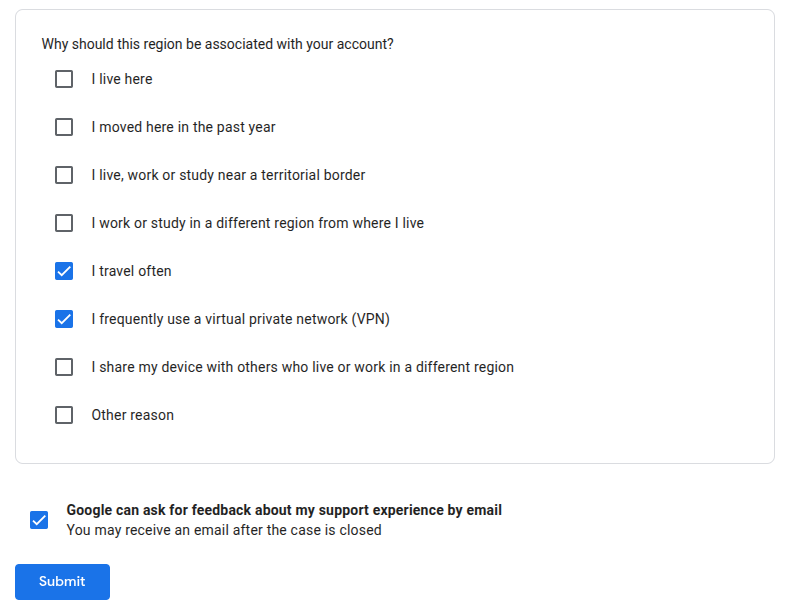
- The system will ask for your reasons. If you have previously paid for Google services from this account, selecting the following two options is usually sufficient:
- I travel frequently
- I frequently use a virtual private network (VPN)
- Confirm the request. The region change occurs automatically within 24–48 hours and does not require credit card details.
Step 4. Setting Up a Clean Environment, Enabling Shustree, and Account Registration
- Prepare a clean browser / profile: Install a separate clean browser that you haven't used before (e.g., Opera or Microsoft Edge), or create a new temporary profile in your current browser (click your profile avatar in the upper right corner of Chrome/Edge/Yandex → "Add new profile").
- Install and enable Shustree: Inside this new browser or profile, install the Shustree extension, log in with your paid ID, and activate a connection to a European gateway (e.g., Warsaw or Frankfurt).
- Register a new Google account: While inside the isolated browser under a European IP, proceed to register a new Google account.
Note on phone verification: When registering from a clean environment under an overseas IP, Google often allows skipping phone number entry. If the system still requests SMS verification, you may use your current number (+7)—the phone number itself does not block the creation of a European payment profile in the subsequent steps.
Step 5. Paying for a Google Flow Subscription from Russia (2 Options)
«If you need to purchase a premium plan for Google Flow, or if your country change request was rejected, the following ruble-friendly payment methods are available:
Option 1. Creating a European Google Pay Profile
- In the same clean window with the active Shustree proxy, navigate to the payments management section: pay.google.com/gp/w/home/settings.
- Under the "Payments Profile" section, click the pencil icon next to the "Country/Region" field and select "Create new profile".
- Select your target country: Poland, Germany, or the Netherlands.
- Enter address details: provide any valid street address, city, and ZIP code of a hotel from Google Maps in the selected country.
- Click "Save". If necessary, your old payment profile (Russia) can be closed at the bottom of the same page so that the account is unambiguously bound to the EU region. To pay for subscriptions, you can subsequently attach a prepaid virtual credit card (VCC) purchased in RUB.
Option 2. Google Play Gift Cards
Purchase a digital Google Play Gift Card top-up code (US or EU region) paying in rubles via verified digital goods marketplaces:
- Visit Plati.Market or a similar payment intermediary service and search for "Google Play Gift Card US" or "Google Play Germany". Sellers accept payment via SBP and MIR cards.
- Navigate to play.google.com/redeem with the Shustree proxy enabled.
- Enter the code. Google will prompt you to create a profile for the corresponding country, activate the balance, and assign the new region to your account.
Step 6. Configuring Google Play and Downloading Google Flow Updates
If your primary Google Play account still shows Russia or a Central Asian country as its region, the Google Flow app may be unavailable for download or may stop receiving updates.
- Do not remove your primary Russian account. It remains necessary for local purchases and local service usage within Russia.
- Go to Smartphone Settings → Accounts and add a secondary Google account (either an international one or updated to Germany/US following the steps above), if you have not done so already.
- Open the Google Play app, tap your profile avatar in the upper right corner, and switch to the new international account.
- Enable the Shustree proxy and download the current version of Google Flow.
- Going forward, you can switch between Google Play profiles depending on which application you need to install or update.
By updating your account region and configuring traffic routing, regional restrictions are lifted not only for Google Flow. The same profile grants full access to other leading AI services, including Gemini, ChatGPT, and Claude—both via web interfaces and official mobile apps.
Useful Google Play Links (Accessible with Shustree Enabled)
- Download Shustree
- Download Google Flow
- Download Google Gemini
- Download ChatGPT
- Download Claude